Drinks
Pick a drink, set its fill and build layers.
Pour a drink
Section titled “Pour a drink”- Select the glasses to fill.
- On Drinks, tick Drink.
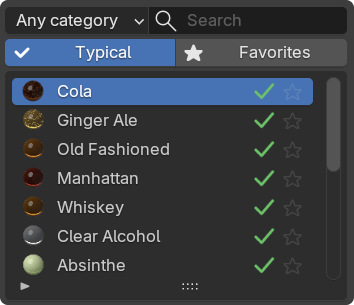
- Pick a drink from the list.
Typical lists the drinks that suit this glass. Turn it off to browse every drink. Star a drink, then turn on Favorites to see only your starred ones. Filter by category or search by name.
Each drink comes with its usual effects, such as bubbles in a beer.
Fill sets the level. The readout shows milliliters poured and the glass’s capacity.
- The reset arrow returns to the usual serving level.
- Changing the drink keeps your fill. Replacing the glass uses the new glass’s level.
- The circular arrows beside Fill open Vary Fill. It spreads the selected glasses across the Variation range and shows the milliliters.
Untick Drink to empty the glass. Tick it again and the same drink comes back.
Level When Tilted keeps the drink and its effects level when a glass tilts. Use it for still renders. For animation, use Slosh.
Slosh (Beta)
Section titled “Slosh (Beta)”Slosh bakes gentle waves from the glass’s animation. No splashes or spilling.
- Animate the glass or its parent.
- Tick Slosh (Beta) and click Bake. It bakes the scene range.
- After any change, click Rebake.
- Fast, Balanced and Best set how finely the bake samples the waves. Best is slowest.
- The wave button holds Speed, Settle, Strength and Tilt Follow. At 1, the first three match a real glass. Tilt Follow at 0 keeps the surface level.
- The bake is saved with the file.
- Slosh is off while a glass holds whipped cream or crushed ice.
- If you turn on an effect after baking, the panel asks for a rebake.
Surface holds ripples, gloss and the meniscus against the wall.
Layers
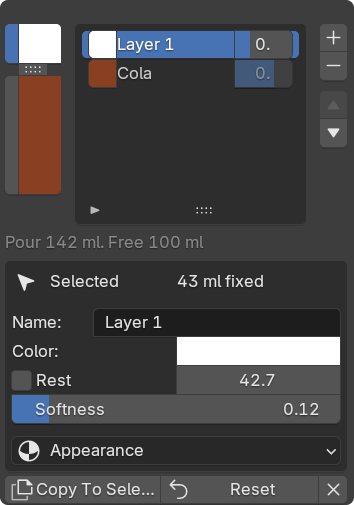
Section titled “Layers”Split the Pour adds a second band, and + adds more. Drag a divider in the strip to resize a band. Select a band in the list to edit it.
- Color / Appearance: a band’s color, depth and cloudiness.
- Rest: this band absorbs Fill changes. Fixed bands keep their volume in ml.
- Softness: blurs the border below a band.
- Copy To Selected: the same layers on the other selected glasses.
- Reset: back to the drink’s recipe.
Stir blends the bands together. At 0 they stay separate.
Save or copy a pour
Section titled “Save or copy a pour”Save Drink adds the pour to Custom Drinks. Later edits to that saved drink save themselves.
To reuse the pour on other glasses, use Copy All and Paste All. To keep it safe, back up your saved drinks.